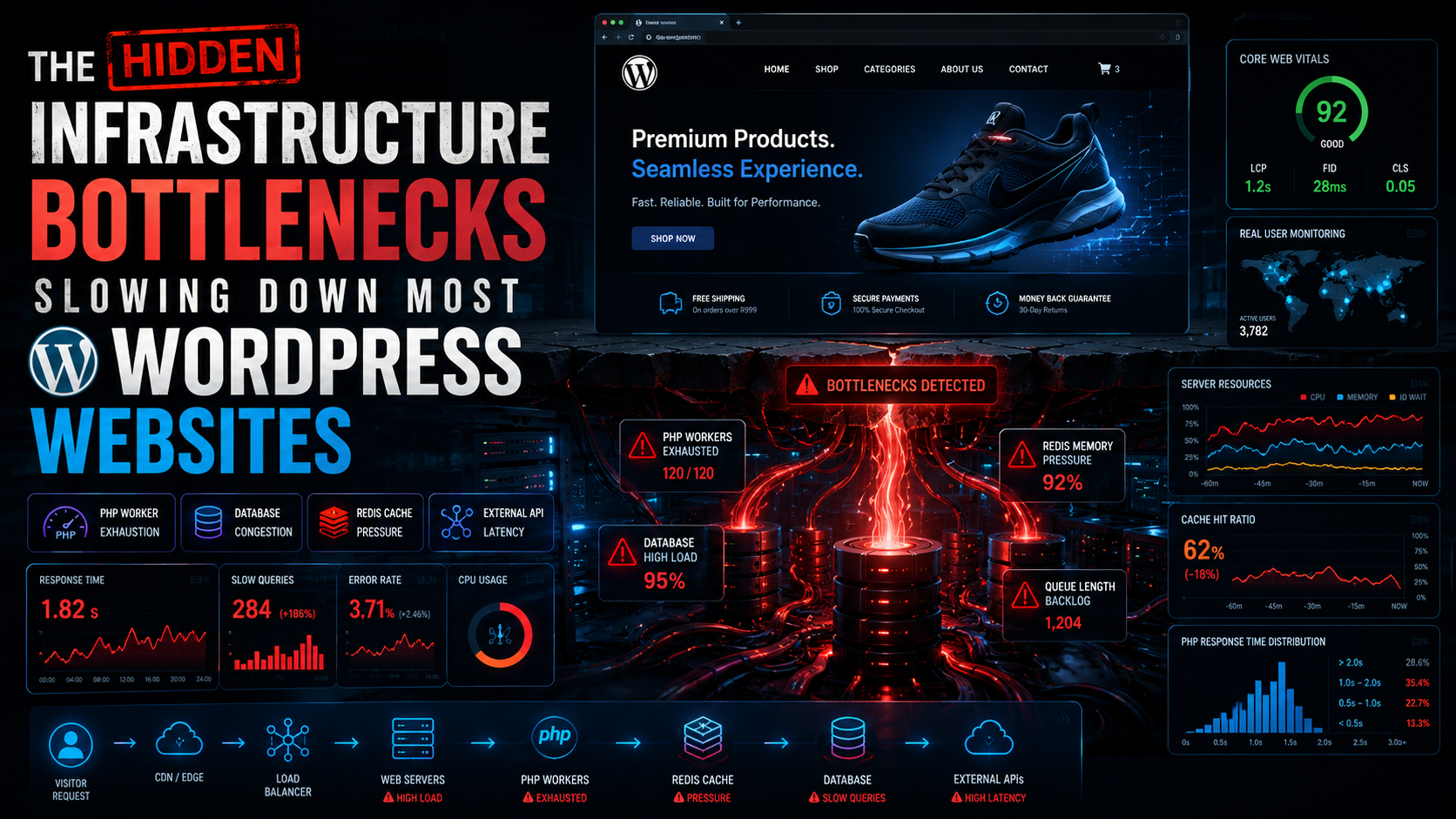
The Hidden Infrastructure Bottlenecks Slowing Down Most WordPress Websites
Many businesses assume that upgrading to premium hosting or installing a caching plugin automatically solves WordPress performance issues. Yet countless WordPress and WooCommerce websites continue struggling with slow page loads, inconsistent checkout performance, server instability, and poor Core Web Vitals despite expensive hosting environments and aggressive optimization plugins.
The problem is that most WordPress performance advice focuses on superficial fixes rather than infrastructure engineering.
Modern WordPress websites are no longer simple CMS platforms serving static pages. They are dynamic application ecosystems handling:
- database-intensive workloads
- API integrations
- real-time customer sessions
- transactional processing
- dynamic inventory management
- caching orchestration
- distributed infrastructure systems
As websites scale, hidden infrastructure bottlenecks begin silently degrading performance behind the scenes. These bottlenecks impact:
- conversion rates
- search rankings
- checkout completion
- customer retention
- infrastructure stability
- operational scalability
A WooCommerce store experiencing even minor latency increases during checkout can lose significant revenue over time. Slow backend response times can trigger abandoned carts, failed payment sessions, and customer frustration long before complete downtime occurs.
At Diamond Stack, we approach WordPress performance optimization as an infrastructure architecture challenge rather than a plugin optimization exercise. High-performance WordPress environments require coordinated systems engineering across servers, databases, caching layers, networking, observability, and deployment orchestration.
This article explores the hidden infrastructure bottlenecks slowing down most WordPress websites and explains how enterprise-grade WordPress infrastructure should be engineered in 2026.
Why Most WordPress Performance Advice Is Wrong
The majority of WordPress optimization advice online focuses on surface-level adjustments.
Typical recommendations include:
- installing caching plugins
- compressing images
- minifying CSS
- reducing plugin count
- enabling lazy loading
While these optimizations have value, they rarely address the underlying infrastructure constraints causing serious performance degradation.
Plugin Obsession
Many site owners believe plugins are the primary reason WordPress websites become slow.
In reality, plugins are often symptoms rather than root causes.
A properly engineered infrastructure environment can support complex plugin ecosystems efficiently when:
- server resources are correctly allocated
- database architecture is optimized
- caching layers are intelligently configured
- query execution is monitored
- concurrency limitations are addressed
The problem is not necessarily plugin quantity. The problem is inefficient infrastructure architecture supporting those plugins.
Superficial Optimization
Most optimization guides focus on frontend metrics while ignoring backend bottlenecks.
This creates misleading performance improvements where:
- homepage scores improve
- synthetic benchmarks look faster
- real user experience remains poor
A website may achieve excellent Lighthouse scores while still suffering:
- slow checkout processing
- delayed database queries
- server thread congestion
- API latency spikes
Real-world performance engineering requires infrastructure-level analysis.
Shared Hosting Limitations
Many WordPress websites operate on oversubscribed shared hosting environments.
Shared hosting introduces:
- CPU throttling
- memory contention
- noisy neighbor problems
- unpredictable latency
- restricted PHP workers
- limited I/O throughput
No amount of plugin optimization can compensate for inadequate infrastructure capacity.
Performance Myths
One of the most damaging myths is that WordPress itself is inherently slow.
In reality, WordPress performance problems usually stem from:
- poor infrastructure architecture
- inefficient query handling
- caching failures
- server misconfiguration
- inadequate scaling strategies
Well-engineered WordPress infrastructure can handle extremely high traffic volumes with exceptional performance.
PHP Worker Exhaustion
PHP worker exhaustion is one of the most common hidden bottlenecks affecting WordPress and WooCommerce websites.
How PHP Workers Function
Each PHP worker processes a single request at a time.
When visitors access a website:
- PHP workers execute WordPress logic
- database queries run
- plugins process functionality
- dynamic content generates
- responses return to users
If all PHP workers become occupied, new requests queue until workers become available.
This creates:
- slow response times
- checkout delays
- backend admin lag
- intermittent timeouts
Concurrency Limitations
WooCommerce stores generate highly dynamic traffic patterns.
Unlike static websites, WooCommerce must process:
- cart sessions
- payment requests
- inventory checks
- customer authentication
- shipping calculations
Each operation consumes worker resources.
During traffic spikes, insufficient PHP workers create request congestion rapidly.
Long-Running Requests
Some plugins generate excessively long execution times.
Common causes include:
- external API requests
- complex database queries
- inventory synchronization
- reporting systems
- backup operations
Long-running requests monopolize PHP workers and reduce concurrency capacity.
Queue Congestion
When request queues build faster than workers process them, websites become unstable.
Symptoms include:
- delayed checkout loading
- inconsistent admin performance
- failed AJAX requests
- intermittent 502 errors
Many businesses mistake these symptoms for hosting instability when the real issue is worker saturation.
Session Locking
WooCommerce session handling introduces additional complexity.
Improper session locking can:
- block concurrent requests
- delay cart updates
- slow checkout flows
- increase backend contention
High-traffic WooCommerce stores require advanced session management optimization.
Database Bottlenecks
Databases are often the largest hidden performance bottleneck in WordPress infrastructure.
Slow MySQL Queries
WordPress generates extensive database activity.
Poor query optimization causes:
- excessive CPU usage
- disk I/O congestion
- lock contention
- query backlog accumulation
Even milliseconds of query delay compound significantly under heavy traffic.
wp_options Table Bloat
The wp_options table becomes severely bloated in many WordPress installations.
This commonly results from:
- abandoned plugin data
- excessive transient storage
- autoloaded configuration overload
- poor cleanup routines
Bloated options tables dramatically slow WordPress initialization.
Autoloaded Options
Autoloaded options load during every request.
Excessive autoloaded data:
- increases memory usage
- slows request initialization
- amplifies cache pressure
Large WooCommerce environments often suffer from autoloaded option overload.
Missing Indexes
Database indexes determine query efficiency.
Poor indexing causes:
- full table scans
- excessive CPU utilization
- slow reporting queries
- backend admin lag
WooCommerce order tables become especially vulnerable as transaction volumes grow.
WooCommerce Order Table Stress
WooCommerce databases experience constant transactional activity.
High-order volumes generate:
- inventory synchronization overhead
- payment processing queries
- analytics aggregation
- reporting complexity
Without database optimization, scaling becomes increasingly difficult.
Query Optimization Strategies
Advanced optimization techniques include:
- query profiling
- index optimization
- table partitioning
- read replicas
- query caching
- connection pooling
Enterprise WooCommerce infrastructure requires ongoing database engineering rather than occasional cleanup plugins.
Redis and Object Cache Misconfiguration
Redis object caching can dramatically improve WordPress performance when configured correctly.
However, poor Redis implementation creates serious bottlenecks.
Redis Memory Limits
Redis operates in memory.
Improper memory allocation causes:
- cache eviction
- inconsistent object persistence
- degraded performance
- elevated database load
Memory pressure destabilizes caching efficiency rapidly.
Stale Object Caching
Object cache invalidation is extremely important.
Poor invalidation logic causes:
- outdated product data
- stale inventory visibility
- inconsistent checkout behavior
- broken customer sessions
Caching systems must remain synchronized with dynamic WooCommerce activity.
Transient Overload
Many plugins abuse WordPress transients.
Excessive transient usage creates:
- database pressure
- object cache fragmentation
- elevated memory consumption
Transient overload is common in plugin-heavy WooCommerce environments.
Session Persistence Issues
WooCommerce sessions often rely on Redis persistence.
Improper session handling can create:
- lost carts
- inconsistent logins
- checkout instability
Session engineering becomes critical at scale.
CDN and Edge Delivery Problems
Content delivery architecture plays a major role in WordPress performance.
DNS Latency
DNS resolution delays affect every request.
Poor DNS infrastructure increases:
- connection establishment time
- page rendering delays
- geographic latency
Global audiences require intelligent DNS routing.
Poor Geographic Routing
Traffic routed inefficiently creates unnecessary latency.
Without edge optimization:
- international users experience slow loading
- checkout performance degrades globally
- API response times increase
Cache Misses
CDNs function efficiently only when cache policies are engineered properly.
Poor cache rules create:
- excessive origin requests
- bandwidth waste
- infrastructure overload
Oversized Assets
Many WordPress websites serve unnecessarily large:
- images
- JavaScript bundles
- CSS files
- font assets
Large asset delivery increases:
- render delays
- mobile performance degradation
- bandwidth consumption
Edge Caching Architecture
Enterprise infrastructure uses intelligent edge caching strategies for:
- static assets
- HTML caching
- API acceleration
- geographic optimization
Edge architecture significantly reduces origin server pressure.
CPU and Memory Throttling
Infrastructure resource limitations are often invisible until websites experience traffic spikes.
Shared Hosting Oversubscription
Shared hosting providers frequently oversubscribe resources.
This creates:
- unpredictable performance
- noisy neighbor effects
- inconsistent CPU allocation
Traffic spikes elsewhere on the server can affect unrelated websites.
Cloud Instance Limitations
Cloud hosting introduces additional complexity.
Improper instance sizing creates:
- CPU saturation
- memory exhaustion
- storage bottlenecks
Many websites scale vertically without addressing architectural inefficiencies.
Burstable CPU Problems
Burstable cloud instances often throttle sustained workloads.
This leads to:
- performance collapse during traffic spikes
- inconsistent response times
- checkout instability
WooCommerce stores require predictable compute performance.
Memory Exhaustion
Insufficient memory allocation causes:
- PHP process termination
- swap usage
- elevated latency
- server instability
Memory pressure frequently appears during:
- imports
- backups
- plugin updates
- reporting generation
Container Resource Constraints
Containerized environments require careful resource management.
Poorly configured containers can:
- throttle applications
- limit concurrency
- destabilize workloads
Container orchestration requires infrastructure expertise.
Inefficient WooCommerce Architecture
WooCommerce introduces significant dynamic complexity compared to traditional WordPress websites.
AJAX Fragmentation
WooCommerce heavily uses AJAX requests.
Excessive AJAX activity increases:
- server concurrency pressure
- PHP worker utilization
- database overhead
Cart fragment abuse is especially problematic.
Cart Fragment Abuse
Many themes and plugins misuse WooCommerce cart fragments.
This creates unnecessary requests on:
- homepage visits
- category pages
- landing pages
The result is elevated infrastructure load without functional benefit.
Plugin Bloat
WooCommerce ecosystems often accumulate excessive plugins over time.
Each plugin may introduce:
- database queries
- API calls
- scheduled tasks
- frontend assets
Plugin accumulation gradually increases infrastructure complexity.
Dynamic Page Generation
Unlike static websites, WooCommerce generates:
- personalized pricing
- inventory availability
- customer-specific recommendations
- dynamic shipping calculations
This reduces caching efficiency and increases compute demand.
Inventory Synchronization Stress
Large stores frequently integrate with:
- ERPs
- warehouse systems
- supplier feeds
- POS platforms
Inventory synchronization introduces:
- API latency
- database write pressure
- queue congestion
Third-Party API Latency
External services frequently become hidden infrastructure bottlenecks.
Payment Gateway Delays
Payment gateways directly affect checkout speed.
Poor gateway performance creates:
- abandoned carts
- failed transactions
- customer frustration
Gateway latency must be continuously monitored.
Shipping API Bottlenecks
Real-time shipping calculations increase checkout complexity.
API bottlenecks create:
- delayed cart updates
- inaccurate shipping estimates
- failed checkout workflows
CRM Integrations
CRM synchronization often introduces hidden latency.
Large WooCommerce environments may process:
- customer sync operations
- lead tracking
- marketing automation
- segmentation updates
Poor integration architecture degrades performance rapidly.
Webhook Congestion
Webhook systems generate asynchronous traffic loads.
Improper webhook handling creates:
- queue congestion
- delayed processing
- server spikes
Asynchronous infrastructure requires intelligent orchestration.
Infrastructure Observability and Monitoring
Without observability, infrastructure bottlenecks remain invisible until failures occur.
Log Aggregation
Centralized logging allows engineers to identify:
- PHP errors
- database slow queries
- API failures
- infrastructure anomalies
Fragmented logs slow troubleshooting dramatically.
APM Monitoring
Application Performance Monitoring provides deep visibility into:
- transaction traces
- request timing
- query execution
- code bottlenecks
APM systems are essential for enterprise WordPress environments.
Database Profiling
Database profiling identifies:
- inefficient queries
- lock contention
- indexing problems
- execution delays
Continuous profiling improves long-term scalability.
Infrastructure Telemetry
Modern infrastructure engineering depends on telemetry systems tracking:
- CPU utilization
- memory pressure
- network throughput
- queue depth
- worker saturation
Real-Time Alerting
Proactive alerting reduces incident response time significantly.
Critical alerts should monitor:
- elevated response times
- checkout failures
- infrastructure instability
- cache degradation
How High-Performance WordPress Infrastructure Should Be Engineered
Enterprise-grade WordPress infrastructure requires coordinated systems engineering.
Autoscaling
Autoscaling infrastructure dynamically adjusts resources during traffic spikes.
This includes:
- application scaling
- worker scaling
- database capacity management
Load Balancing
Load balancers distribute requests efficiently across infrastructure nodes.
Benefits include:
- redundancy
- failover protection
- improved concurrency
- traffic distribution
Containerized Hosting
Containerization improves:
- deployment consistency
- scalability
- isolation
- operational reliability
Modern WordPress infrastructure increasingly relies on container orchestration platforms.
Database Replication
Database replication improves:
- read scalability
- redundancy
- failover capability
High-volume WooCommerce stores often require read/write separation.
Redis Clustering
Redis clustering improves:
- cache scalability
- memory distribution
- resilience
Advanced caching architecture reduces database pressure dramatically.
Edge Optimization
Edge infrastructure reduces latency globally through:
- geographic content distribution
- edge caching
- DNS acceleration
- request routing optimization
Infrastructure as Code
Infrastructure should be reproducible and version-controlled.
Infrastructure as Code enables:
- deployment consistency
- disaster recovery automation
- operational scalability
Real-World Infrastructure Failure Scenario
Consider a WooCommerce store during a major promotional campaign.
Traffic increases rapidly.
Initially:
- frontend performance appears stable
- cache hit ratios remain healthy
But hidden bottlenecks emerge:
- PHP workers saturate
- Redis memory pressure increases
- checkout API latency spikes
- database queries queue
- cart sessions begin failing
The website may technically remain online while customer experience collapses.
Without infrastructure observability, businesses often misdiagnose the problem entirely.
Enterprise infrastructure engineering identifies and resolves bottlenecks before revenue impact occurs.
Why WordPress Infrastructure Engineering Matters in 2026
Modern WordPress and WooCommerce websites have evolved into complex distributed application ecosystems.
They are no longer simple CMS installations.
Today’s high-performance WordPress environments require:
- infrastructure architecture
- systems engineering
- observability
- caching orchestration
- deployment automation
- database optimization
- scalability engineering
Businesses relying on outdated hosting models and superficial optimization tactics will struggle to compete as traffic volumes, customer expectations, and application complexity continue increasing.
At Diamond Stack, we engineer WordPress infrastructure for performance, scalability, resilience, and operational stability. Our infrastructure optimization approach combines enterprise-grade architecture, advanced observability, database engineering, intelligent caching systems, and scalable deployment strategies designed specifically for high-performance WordPress and WooCommerce environments.
If your WordPress or WooCommerce website suffers from unexplained slowdowns, infrastructure instability, checkout bottlenecks, or scaling limitations, Diamond Stack can help design and optimize an infrastructure ecosystem engineered for modern digital performance demands.